
Rust
安装与配置
安装 Rust
### linux
curl --proto '=https' --tlsv1.2 -sSf https://sh.rustup.rs | sh

### window
# 安装Visual Studio C++生成工具,这是Rust在Windows上编译程序所必需的
	https://visualstudio.microsoft.com/zh-hans/visual-cpp-build-tools/
	* 下载并安装"Visual Studio Build Tools"
	* 在安装程序中选择"C++生成工具"组件

# 下载并运行Rust安装程序
	https://www.rust-lang.org/tools/install
	* 点击下载 rustup-init.exe
	* 运行下载的安装程序
	* 完成安装
	* 运行安装程序时,选择默认安装选项(按回车键)
	* 等待安装完成
	* 安装完成后,打开新的命令提示符或PowerShell窗口

# 验证安装
	打开命令提示符或PowerShell,输入以下命令验证安装:
	rustc --version
	cargo --version

# 安装IDE
	* 安装 Visual Studio Code
	* 在 VSCode 中安装 "rust-analyzer" 扩展
安装 VSCode 插件
- crates: Rust 包管理
- Even Better TOML: TOML 文件支持
- Better Comments: 优化注释显示
- Error Lens: 错误提示优化
- GitLens: Git 增强
- Github Copilot: 代码提示
- indent-rainbow: 缩进显示优化
- Prettier - Code formatter: 代码格式化
- REST client: REST API 调试
- rust-analyzer: Rust 语言支持
- Rust Test lens: Rust 测试支持
- Rust Test Explorer: Rust 测试概览
- TODO Highlight: TODO 高亮
- vscode-icons: 图标优化
- YAML: YAML 文件支持
cargo设置国内源
C:\Users\chao1.cargo
[source.crates-io]
replace-with = 'ustc'

[source.ustc]
registry = "git://mirrors.ustc.edu.cn/crates.io-index"
安装 cargo generate
cargo generate 是一个用于生成项目模板的工具。它可以使用已有的 github repo 作为模版生成新的项目。
cargo install cargo-generate
在我们的课程中,新的项目会使用 tyr-rust-bootcamp/template 模版生成基本的代码:
cargo generate tyr-rust-bootcamp/template

### 查看目录
C:\Windows\System32\testproject
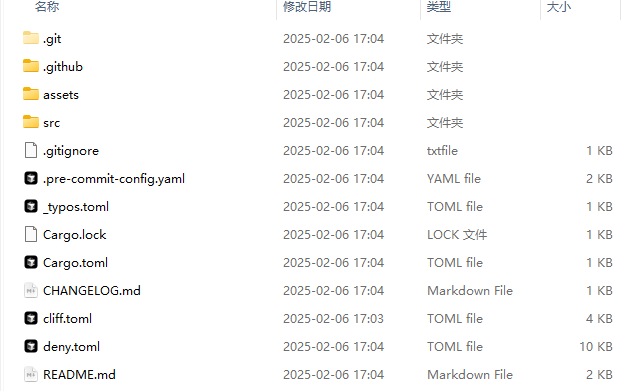 `
`
安装 pre-commit
pre-commit 是一个代码检查工具,可以在提交代码前进行代码检查。
pipx install pre-commit
安装成功后运行 pre-commit install 即可。
安装 Cargo deny
Cargo deny 是一个 Cargo 插件,可以用于检查依赖的安全性。
cargo install --locked cargo-deny
安装 typos
typos 是一个拼写检查工具。
cargo install typos-cli
安装 git cliff
git cliff 是一个生成 changelog 的工具。
cargo install git-cliff
安装 cargo nextest
cargo nextest 是一个 Rust 增强测试工具。
cargo install cargo-nextest --locked
生成项目
cargo generate --git https://github.com/tyr-rust-bootcamp/template.git
推送Gitee
git config --global user.name "SoulBoy"
git config --global user.email "rtsfan1024@gmail.com"

mkdir rust-first
cd rust-first
git init
touch README.md
git add README.md
git commit -m "first commit"
git remote add origin https://gitee.com/wang-chao1990/rust-first.git
git push -u origin "master"
运行项目
PS C:\Windows\System32\testproject> cargo run
    Finished `dev` profile [unoptimized + debuginfo] target(s) in 0.01s
     Running `target\x86_64-pc-windows-msvc\debug\template.exe`
Hello, world!
Code Review什么
在做 Code review 时,我们该做些什么? CI可以检查的部分就不要人检查。
- 架构
- 接口设计
- 代码质量最佳实践,可读性,性能,安全性
- 错误处理
- 可维护性:DRYI,KISS,SOLID,文档团队特定的实践